There’s a certain irony in being an iOS developer that after more than 10 years focused just on iOS, starts questioning the status quo. So why would anyone choose to walk away from the well-paved roads and venture into the wilderness?
The thing is that I started to feel something uncomfortable: dependency. Not the technical kind you manage with SPM or CocoaPods, but something deeper. My entire skill set, my career, my ability to build things, all of it locked behind Apple’s walled garden. What happens when Apple decides to deprecate something you’ve mastered? What happens when Apple withdraws from the EU regulatory bureaucratic hell? (yes, I keep this option in serious consideration: have a look at the status of the world right now and make your own conclusions) What happens when you want to build something that runs everywhere, not just on devices with the apple logo? What happens when you start feeling the pain while using Xcode, with its slow builds, its opaque error messages, and all the bugs and crashes? These questions became real concerns that made me question the sustainability of my career and the freedom to create. So I started exploring: I went deep into the rabbit hole, I wanted more, I needed more, to keep alive the burning flame of passion. I found Rust. I found a way to use in Mobile development.
The mobile ecosystem is fractured by design
We’ve accepted that building for iOS and Android means maintaining two codebases, two mental models, two sets of bugs, and most importantly, as if there weren’t already enough divisions in the world, we fractured these two platforms in two distinct ideologies, on the verge of religious fanaticism. We’ve normalized the inefficiency because “that’s just how it is. Adopting Rust for Mobile offers something different: not a compromise like the cross-platform frameworks that abstract away the platforms until they abstract away the performance too, or a “write once, debug everywhere” promise that never quite delivers. Instead, Rust offers a Foundation: a shared core of logic, networking, data handling, and business rules that can be written once, then seamlessly integrated into truly native applications.
What I’m talking about is a language that guarantees memory safety without a garbage collector, enforces correctness at compile time, and performs like C while feeling like a modern language.
But let’s be honest: this path is not that easy, unfortunately, and the learning curve is real.
The Shared Logic Problem
Every mobile developer knows this pain: you implement a feature on iOS, then you (or someone else) implements the same feature on Android. Two implementations of the same business logic. Two chances to introduce bugs. Two codebases that slowly drift apart until they’re solving the same problem in subtly different ways.
Cross-platform frameworks promise to solve this, but they come with trade-offs. Flutter gives you a single codebase but a non-native UI. React Native bridges JavaScript (the Horror) to native, adding layers of abstraction and performance overhead. Kotlin Multiplatform is promising but still maturing.
Adopting Rust will mean taking a different approach: keep the UI native, share the core. Networking layer, data models, business rules wrote once in Rust, exposed through clean interfaces, while Kotlin and Swift only handle the native UI layer.
Performance Without Compromise
In Swift, you can write performant code, but you’re always dancing with ARC, and potential retain cycles which cause memory leaks. In Kotlin, the JVM adds its own overhead. In both, when you truly need speed, you end up dropping down to C or C++ which are languages that will happily let you shoot yourself in the foot with memory corruption, buffer overflows, and undefined behavior. Rust gives you C-level performance with modern safety guarantees: the compiler catches entire categories of bugs before your code ever runs. Ownership and borrowing are the foundation of how you write code. They force you to think about data flow, lifetimes, and mutability in ways that make your code safer and more efficient. There’s something deeply satisfying about Rust’s approach to correctness: it forces you to think about ownership, lifetimes, and data flow in ways that make you a better programmer in any language. When Rust code compiles, you have genuine confidence: race conditions become compile-time errors. Null pointer exceptions are impossible. Memory leaks require deliberate effort.
A year ago, learning Rust for mobile would have meant weeks of struggling with the borrow checker, cryptic error messages, and a steep learning curve. Today, with AI as a learning companion, that curve has flattened dramatically. I can ask questions, get explanations tailored to my iOS background, and understand concepts that would have taken much longer to grasp on my own. The timing felt right. The tools have matured. The ecosystem has grown. And the motivations have never been clearer.
A Proof of Concept: Building a Shared Rust Logic Mobile App
Let’s try to build a simple app on android and iOS that shares the same Rust logic. A notes app. Nothing fancy, nothing complicated, just a proof of concept, but enough to see the full picture: data models, CRUD operations, error handling, and async code, all shared between platforms. Despite at the very beginning of my career as a mobile developer I was able to seamlessly switch between Android and iOS, I’ve been out of practice for 10 years, and I’m a bit RUSTY (ahhah). However, AI has come to the rescue for this, and in a matter of ours I recovered the basic and I was able to assemble the Android version in a reasonable time.
The idea is simple. The UI stays native: SwiftUI on iOS, Jetpack Compose on Android. The core logic lives in Rust. The bridge between the two is UniFFI, a tool from Mozilla that reads Rust code and generates idiomatic Swift and Kotlin bindings automatically.
With UniFFI, Rust types are just annotated with proc-macros, Rust procedural macros functions that operate on token streams: they take code as input, transform it, and produce new code as output at compile time.
This is a draft of the basic architecture of the app:
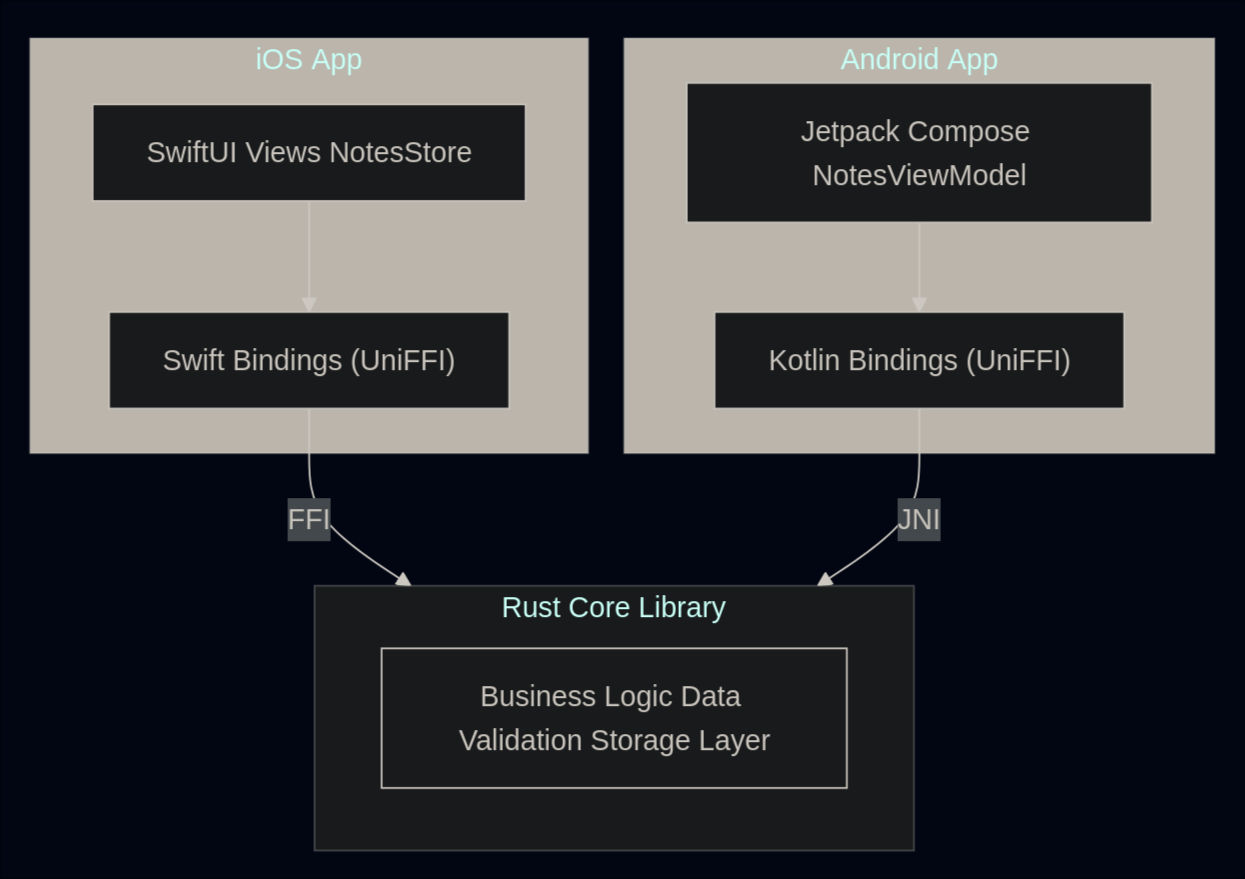
Prerequisites
First, let’s install Rust. The recommended way is through rustup, which manages Rust versions and toolchains:
curl --proto '=https' --tlsv1.2 -sSf https://sh.rustup.rs | shThen, install and configure a good Rust IDE (I recommend Neovim, the best text editor in the world, with the rust-analyzer plugin for code completion, inline documentation, and error highlighting).
Writing the Rust Core
All the shared logic lives here, and it will be identical on both platforms.
The Cargo.toml tells Rust what kind of library to produce:
[package]
name = "notes_core"
version = "0.1.0"
edition = "2021"

[lib]
crate-type = ["staticlib", "cdylib"]
name = "notes_core"

[dependencies]
uniffi = { version = "0.31", features = ["cli", "tokio"] }
uuid = { version = "1.0", features = ["v4"] }
chrono = "0.4"
tokio = { version = "1", features = ["sync"] }

[build-dependencies]
uniffi = { version = "0.31", features = ["build"] }

[[bin]]
name = "uniffi-bindgen"
path = "uniffi-bindgen.rs"
The key here is crate-type = ["staticlib", "cdylib"]:this produces both a .a file (what iOS needs) and a .so file (what Android needs) from the same source code.
UniFFI will generate the corresponding Swift and Kotlin types automatically:
#[derive(Debug, thiserror::Error, uniffi::Error)]
pub enum NotesError {
    #[error("Note not found")]
    NoteNotFound,
    #[error("Invalid data")]
    InvalidData,
    #[error("Storage error")]
    StorageError,
}

#[derive(Clone, Debug, uniffi::Record)]
pub struct Note {
    pub id: String,
    pub title: String,
    pub content: String,
    pub created_at: i64,
    pub updated_at: i64,
}

#[derive(Clone, Debug, uniffi::Record)]
pub struct CreateNoteInput {
    pub title: String,
    pub content: String,
}

#[derive(Clone, Debug, uniffi::Record)]
pub struct UpdateNoteInput {
    pub title: Option<String>,
    pub content: Option<String>,
}
That Option<String> in Rust becomes String? in Swift and String? in Kotlin. The mapping is intuitive.
The Business Logic
The NotesManager is the heart of the app:
use std::collections::HashMap;
use std::sync::Arc;
use tokio::sync::RwLock;
use uuid::Uuid;

use crate::error::NotesError;
use crate::models::{CreateNoteInput, Note, UpdateNoteInput};

#[derive(uniffi::Object)]
pub struct NotesManager {
    notes: Arc<RwLock<HashMap<String, Note>>>,
}

#[uniffi::export]
impl NotesManager {
    #[uniffi::constructor]
    pub fn new() -> Arc<Self> {
        Arc::new(Self {
            notes: Arc::new(RwLock::new(HashMap::new())),
        })
    }

    pub async fn create_note(&self, input: CreateNoteInput) -> Result<Note, NotesError> {
        if input.title.trim().is_empty() {
            return Err(NotesError::InvalidData);
        }

        let now = current_timestamp();
        let note = Note {
            id: Uuid::new_v4().to_string(),
            title: input.title,
            content: input.content,
            created_at: now,
            updated_at: now,
        };

        let mut notes = self.notes.write().await;
        notes.insert(note.id.clone(), note.clone());
        Ok(note)
    }

    pub async fn get_note(&self, id: String) -> Result<Note, NotesError> {
        let notes = self.notes.read().await;
        notes.get(&id).cloned().ok_or(NotesError::NoteNotFound)
    }

    pub async fn list_notes(&self) -> Result<Vec<Note>, NotesError> {
        let notes = self.notes.read().await;
        let mut all_notes: Vec<Note> = notes.values().cloned().collect();
        all_notes.sort_by(|a, b| b.updated_at.cmp(&a.updated_at));
        Ok(all_notes)
    }

    pub async fn update_note(&self, id: String, input: UpdateNoteInput) -> Result<Note, NotesError> {
        let mut notes = self.notes.write().await;
        let note = notes.get_mut(&id).ok_or(NotesError::NoteNotFound)?;

        if let Some(title) = input.title {
            if title.trim().is_empty() {
                return Err(NotesError::InvalidData);
            }
            note.title = title;
        }

        if let Some(content) = input.content {
            note.content = content;
        }

        note.updated_at = current_timestamp();
        Ok(note.clone())
    }

    pub async fn delete_note(&self, id: String) -> Result<(), NotesError> {
        let mut notes = self.notes.write().await;
        notes.remove(&id).ok_or(NotesError::NoteNotFound)?;
        Ok(())
    }

    pub async fn search_notes(&self, query: String) -> Result<Vec<Note>, NotesError> {
        let notes = self.notes.read().await;
        let query_lower = query.to_lowercase();

        let mut results: Vec<Note> = notes
            .values()
            .filter(|note| {
                note.title.to_lowercase().contains(&query_lower)
                    || note.content.to_lowercase().contains(&query_lower)
            })
            .cloned()
            .collect();

        results.sort_by(|a, b| b.updated_at.cmp(&a.updated_at));
        Ok(results)
    }
}
This code will run identically on both platforms.
NOTE: I made the notes manager async to demonstrate how UniFFI handles Rust’s async functions, mapping them to Swift’s async/await and Kotlin’s coroutines seamlessly.
Testing the Rust Core
Rust core can be tested in isolation, without booting a simulator or an emulator. Just cargo test:
#[cfg(test)]
mod tests {
    use super::*;

    #[tokio::test]
    async fn test_create_note() {
        let manager = NotesManager::new();
        let result = manager
            .create_note(CreateNoteInput {
                title: "Test Note".to_string(),
                content: "This is a test".to_string(),
            })
            .await;

        assert!(result.is_ok());
        let note = result.unwrap();
        assert_eq!(note.title, "Test Note");
        assert_eq!(note.content, "This is a test");
    }

    #[tokio::test]
    async fn test_update_note() {
        let manager = NotesManager::new();
        let note = manager
            .create_note(CreateNoteInput {
                title: "Original".to_string(),
                content: "Content".to_string(),
            })
            .await
            .unwrap();

        let updated = manager
            .update_note(
                note.id.clone(),
                UpdateNoteInput {
                    title: Some("Updated".to_string()),
                    content: None,
                },
            )
            .await
            .unwrap();

        assert_eq!(updated.title, "Updated");
        assert_eq!(updated.content, "Content");
    }

    #[tokio::test]
    async fn test_search_notes() {
        let manager = NotesManager::new();
        manager
            .create_note(CreateNoteInput {
                title: "Rust by the way".to_string(),
                content: "Learning Rust".to_string(),
            })
            .await
            .unwrap();
        manager
            .create_note(CreateNoteInput {
                title: "Rust Guide".to_string(),
                content: "Learning Rust".to_string(),
            })
            .await
            .unwrap();

        let results = manager.search_notes("Rust".to_string()).await.unwrap();
        assert_eq!(results.len(), 2);

        let results = manager.search_notes("Guide".to_string()).await.unwrap();
        assert_eq!(results.len(), 1);
        assert_eq!(results[0].title, "Rust Guide");
    }
}
iOS Build
The relevant iOS portion of the build script compiles for all three targets and creates a fat library for the simulator:
# Build for each architecture
cargo build --release --target aarch64-apple-ios        # device
cargo build --release --target aarch64-apple-ios-sim    # simulator (Apple Silicon)
cargo build --release --target x86_64-apple-ios         # simulator (Intel)

# Create fat library for simulator (arm64 + x86_64)
lipo -create \
    target/aarch64-apple-ios-sim/release/libnotes_core.a \
    target/x86_64-apple-ios/release/libnotes_core.a \
    -output RustFramework/sim/libnotes_core.a

# Generate Swift bindings
cargo run --bin uniffi-bindgen generate \
    --library target/aarch64-apple-ios/release/libnotes_core.a \
    --language swift \
    --out-dir RustFramework/bindings
Xcode Configuration
In the Xcode project’s Build Settings, three things must be set:
-
Library Search Paths — point to the compiled Rust libraries:
$(PROJECT_DIR)/RustFramework/ios $(PROJECT_DIR)/RustFramework/sim -
Other Linker Flags — link the library:
-lnotes_core -
Import Paths (Swift) — tell Swift where to find the generated module:
$(PROJECT_DIR)/NotesApp/Generated
Swift Connection
The Swift wrapper uses the Rust types as if they were native:
import Foundation

@MainActor
final class NotesStore: ObservableObject {
    @Published private(set) var notes: [Note] = []
    @Published private(set) var isLoading = false
    @Published var notesError: NotesError?

    private let manager: NotesManager

    init(manager: NotesManager = NotesManager()) {
        self.manager = manager
        loadNotes()
    }

    func loadNotes() {
        isLoading = true
        Task {
            do {
                notes = try await manager.listNotes()
                notesError = nil
            } catch let err as NotesError {
                notesError = err
            }
            isLoading = false
        }
    }

    func createNote(title: String, content: String) {
        Task {
            do {
                let input = CreateNoteInput(title: title, content: content)
                let newNote = try await manager.createNote(input: input)
                notes.insert(newNote, at: 0)
            } catch let err as NotesError {
                notesError = err
            }
        }
    }

    func deleteNote(id: String) {
        Task {
            do {
                try await manager.deleteNote(id: id)
                notes.removeAll { $0.id == id }
            } catch let err as NotesError {
                notesError = err
            }
        }
    }
}NotesManager, Note, CreateNoteInput, NotesError are Rust objects. The async/await integration is seamless. UniFFI maps Rust’s Result<T, E> to Swift’s throwing functions, and Rust’s async to Swift’s native concurrency.
And for views, pure standard SwiftUI:
struct NotesListView: View {
    @StateObject private var store = NotesStore()
    @State private var searchText = ""
    @State private var showingCreateNote = false

    var body: some View {
        NavigationStack {
            Group {
                if store.isLoading {
                    ProgressView()
                } else if store.notes.isEmpty {
                    ContentUnavailableView(
                        "No Notes",
                        systemImage: "note.text",
                        description: Text("Create your first note to get started")
                    )
                } else {
                    List {
                        ForEach(store.notes, id: \.id) { note in
                            NavigationLink {
                                NoteDetailView(note: note, store: store)
                            } label: {
                                VStack(alignment: .leading) {
                                    Text(note.title).font(.headline)
                                    Text(note.content)
                                        .font(.subheadline)
                                        .foregroundStyle(.secondary)
                                        .lineLimit(2)
                                }
                            }
                        }
                        .onDelete { indexSet in
                            for index in indexSet {
                                store.deleteNote(id: store.notes[index].id)
                            }
                        }
                    }
                }
            }
            .navigationTitle("Notes")
            .searchable(text: $searchText)
            .onChange(of: searchText) { _, newValue in
                store.searchNotes(query: newValue)
            }
        }
    }
}
The UI code has no idea its data comes from Rust. It doesn’t need to.
Android Build
The build script handles Android cross-compilation using the NDK toolchains:
# Build for each Android architecture
cargo build --release --target aarch64-linux-android    # arm64-v8a
cargo build --release --target armv7-linux-androideabi  # armeabi-v7a
cargo build --release --target x86_64-linux-android     # x86_64

# Copy .so files to jniLibs
cp target/aarch64-linux-android/release/libnotes_core.so \
    app/src/main/jniLibs/arm64-v8a/

# Generate Kotlin bindings
cargo run --bin uniffi-bindgen generate \
    --library target/aarch64-linux-android/release/libnotes_core.so \
    --language kotlin \
    --out-dir app/src/main/java
Gradle Configuration
// app/build.gradle.kts
android {
    defaultConfig {
        ndk {
            abiFilters += listOf("arm64-v8a", "armeabi-v7a", "x86_64")
        }
    }
    packaging {
        jniLibs {
            useLegacyPackaging = true
        }
    }
}

dependencies {
    implementation("net.java.dev.jna:jna:5.13.0") { artifact { type = "aar" } }
    implementation("org.jetbrains.kotlinx:kotlinx-coroutines-android:1.7.3")
}
Kotlin Connection
The ViewModel wraps the same NotesManager, the same Rust object, just with Kotlin bindings this time:
class NotesViewModel : ViewModel() {
    private val notesManager = NotesManager()

    private val _uiState = MutableStateFlow(NotesUiState())
    val uiState: StateFlow<NotesUiState> = _uiState.asStateFlow()

    init {
        loadNotes()
    }

    fun loadNotes() {
        viewModelScope.launch(Dispatchers.IO) {
            _uiState.value = _uiState.value.copy(isLoading = true)
            try {
                val notes = notesManager.listNotes()
                _uiState.value = _uiState.value.copy(
                    notes = notes,
                    isLoading = false
                )
            } catch (e: NotesException) {
                _uiState.value = _uiState.value.copy(
                    isLoading = false,
                    error = e.message
                )
            }
        }
    }

    fun createNote(title: String, content: String) {
        viewModelScope.launch(Dispatchers.IO) {
            try {
                val input = CreateNoteInput(title = title, content = content)
                notesManager.createNote(input)
                loadNotes()
            } catch (e: NotesException) {
                _uiState.value = _uiState.value.copy(error = e.message)
            }
        }
    }
}
One thing to notice: Rust errors become NotesException in Kotlin (not NotesError like in Swift). UniFFI generates exception subclasses on the Kotlin side.
And the Compose UI is fully native Material Design 3:
@Composable
fun NotesListScreen(
    viewModel: NotesViewModel,
    onNoteClick: (String) -> Unit,
    onCreateNote: () -> Unit
) {
    val uiState by viewModel.uiState.collectAsState()

    Scaffold(
        topBar = {
            LargeTopAppBar(title = { Text("Notes") })
        },
        floatingActionButton = {
            FloatingActionButton(onClick = onCreateNote) {
                Icon(Icons.Default.Add, contentDescription = "Create note")
            }
        }
    ) { paddingValues ->
        when {
            uiState.isLoading -> CircularProgressIndicator(modifier = Modifier.fillMaxSize())
            uiState.notes.isEmpty() -> EmptyNotesView()
            else -> {
                LazyColumn(contentPadding = paddingValues) {
                    items(uiState.notes, key = { it.id }) { note ->
                        NoteCard(note = note, onClick = { onNoteClick(note.id) })
                    }
                }
            }
        }
    }
}
FFI Call Overhead
Every time Swift or Kotlin calls into Rust, it crosses a Foreign Function Interface boundary. Data types need to be converted between representations (a Swift String is not a Rust String), memory needs to be allocated and copied across the boundary, and on the Kotlin side, JNA adds an additional layer of indirection.
For a single call this overhead is negligible but in a tight loop, it compounds. Making 100 separate FFI calls means 100 type conversions, 100 memory allocations, 100 boundary crossings. So, in order to keep a scalable and performant code, Rust API should handle bulk operations in a single call.
// Good: one FFI crossing
pub fn delete_notes(&self, ids: Vec<String>) -> Result<(), NotesError>

// Bad: N FFI crossings
for id in ids {
    try await manager.deleteNote(id: id)
}Final Thoughts
This architecture works. UniFFI handles the tedious parts, while the build process is handled by a single script.
What excites me most is that a single developer can maintain the core logic for both platforms with confidence. The business logic is written once, tested once, and guaranteed to behave identically everywhere.
Is it more work upfront than picking up Flutter or React Native? Maybe yes, you have to learn Rust, and it’s way difficult than Dart or Javascript. But what you get in return is full native UI, zero runtime overhead (if you design your Rust API well), and a shared core that won’t rot differently on each platform. You can find the proof of concept code on GitHub
Till next time,